Ultrapari offers three registration methods. Account registration takes under a minute and a half, and new Bangladeshi players can claim a welcome bonus of up to 14,450 BDT. A user account gives you access to sports and live betting, the casino, BDT deposits and withdrawals, and promotions. You can sign up on a desktop, in the Android app or through a mobile browser on iOS. For this guide, we tested every method, the registration requirements and account verification.
Who Is Eligible to Create an Account?
Account eligibility at Ultrapari depends on a few basic rules, and breaking any of them blocks verification later:
- Minimum age requirement: 18 years, checked during age verification.
- Country of residence: must not be on the operator’s restricted list. Bangladesh is not on it.
- Single account policy: one account per person. Duplicates are closed.
- Real data: your name and phone number must match your ID.
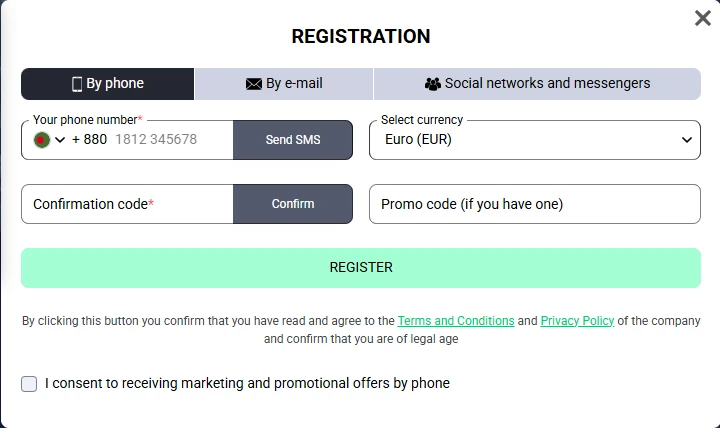
Step-by-Step Account Registration Guide
The registration process at Ultrapari comes down to picking a method and filling in your personal information. We went through account creation with every available method, both on a PC and on a smartphone. The steps below follow that test.
Choose a Registration Method
Click “Registration” and pick email registration, a phone number with an SMS code, or social media login. Social options include Google, Telegram, Apple ID and Discord.
Select a Welcome Bonus
Choose a first deposit bonus before you deposit: 100% up to 14,450 BDT for sports, or 100% up to 42,000 BDT plus 30 FS for casino. A promo code field is optional. You can also decline both offers.
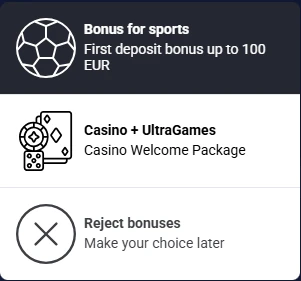
Fill Out the Form
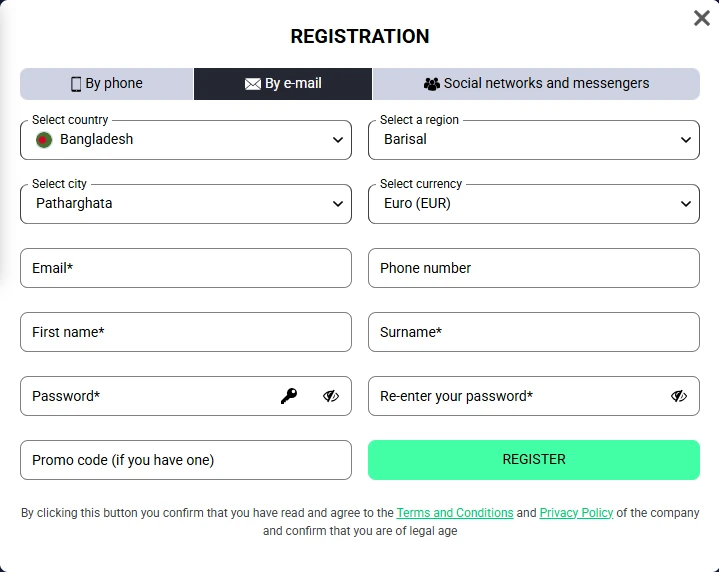
The form depends on the method. Email sign-up asks for your full name, email address, mobile phone number, location and password. Phone registration needs only the number and SMS code. Social login asks for your country and currency.
Click the “Register” Button
Before submitting the registration form, check that your country, BDT currency, email and phone number are correct. Clicking “Register” confirms you are 18 or older and accepts the Terms and Conditions. Account creation then completes instantly.
Account Activation and Email Verification
After sign-up, Ultrapari sends a verification link to your email. Follow it within 10 minutes to complete email confirmation. Your account status then switches to active. This extra step protects the account from unauthorized access.
When Is Identity Verification (KYC) Required?
Know Your Customer (KYC) checks become mandatory before your first withdrawal. Ultrapari may also request identity verification during a security review or before applying self-exclusion. Usually a passport or national ID is enough for personal data verification. For withdrawal verification, the operator can additionally ask for a photo of you holding the document.
Email, Phone and Social Media Registration: Testing Results
We tested every Ultrapari registration method on a Xiaomi Redmi Note 13 over Wi-Fi between 28 October and 2 November.
| Registration method | Required information | Promo code | Tested time |
|---|---|---|---|
| Country, region, city, currency, full name, password | Not used | 65–80 seconds | |
| Phone | Phone number, currency, confirmation code | Not used | 75–90 seconds |
| Social networks | Country, currency, Google account | Not used | 45–60 seconds |
How to Enable Automatic Login
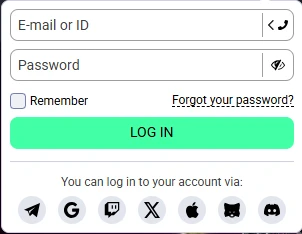
The Remember Me option on the Ultrapari login page saves your login credentials in the browser. The fields then fill automatically in the next browser session. Use it only on a personal device, since anyone with access to it can sign in.
Common Sign Up Problems and Fixes
Most registration errors come from small input mistakes and are fixed in a minute:
- Invalid personal information: enter your name exactly as it appears on your ID, or KYC will fail later.
- Email verification issues: if the link has expired after 10 minutes or never arrived, check your spam folder and request a new one.
- SMS confirmation code not received: check that the number follows +880 without a leading zero, then resend the code.
- Duplicate account restrictions: a second account gets blocked, so restore access to your existing one instead of registering again.
If the problem persists, live chat resolves it fastest. For cases that need documents, write to [email protected].