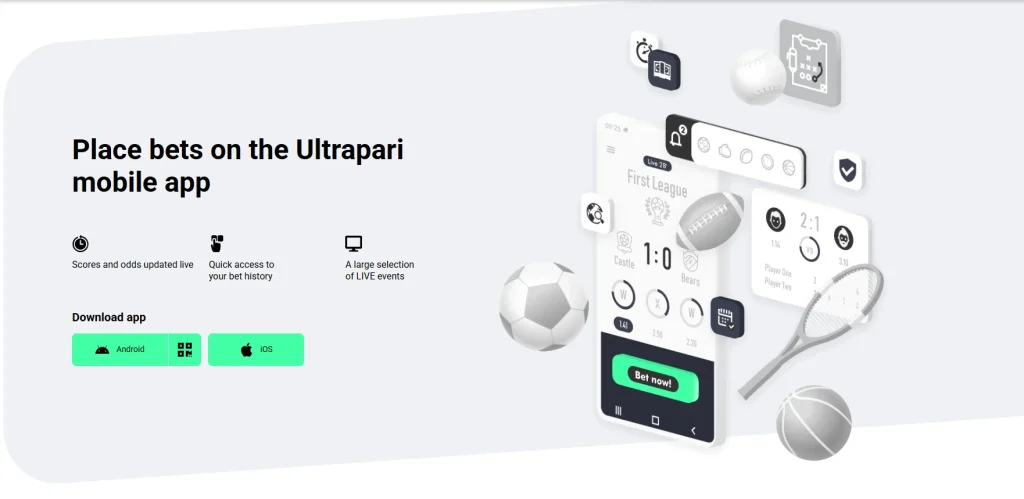
The UltraPari App is an Android application for sports betting and casino games, distributed as an Android APK from the operator’s official website. It’s built for Android smartphones used in Bangladesh and runs on the same account and balance as the website. This guide covers the system requirements, installation, updates, fixes for common errors and the option for iPhone users, who don’t get a native mobile betting app.
The Difference Between an App and a Mobile Website
An APK is the installation package of a native Android application. Once installed, UltraPari opens from its own icon and runs separately from the browser. The mobile website, by contrast, needs no installation: you open it in Chrome or any other browser.
Both versions offer the same mobile interface and sections. The app loads faster and adds push notifications, which browser access doesn’t provide. On iPhone, the site can be added to the home screen as a Progressive Web App (PWA), but that’s still the website, not an app.
Where to Download the App
The APK is hosted on UltraPari’s official website on the .com domain. To find it, open the homepage, go to the app section and tap the Download button next to the Android icon. The file you get is ultrapari-v255.0.0, about 40.6 MB in size.
UltraPari isn’t on Google Play, because Google doesn’t allow real-money betting apps in Bangladesh. That gap is filled by third-party sites offering their own “UltraPari APK download link”. Such files may be outdated or modified, so check that the version and size match what the official site shows.
Minimum Android Requirements
Compatibility depends on the Android version and processor, not the brand. Samsung, Xiaomi, Realme, OPPO and Vivo phones all qualify if they run Android 7.0 or later on an ARM64 chip. Keep about 200 MB of internal storage free.
| Parameter | Information |
|---|---|
| App version | ultrapari-v255.0.0 |
| APK size | ~40.6 MB |
| Installed size | ~120–140 MB |
| Minimum Android | Android 7.0 |
| Recommended Android | Android 10+ |
| Architecture | ARM64 |
| SHA-256 hash | Verify on the site |
How to Download the UltraPari APK on Android
We tested the download and installation on a Redmi Note 15 Android device. Below is the full process: getting the Ultrapari APK package from the official site, finding it in the Downloads folder and installing it through the APK installer.
Step 1 – Download the APK File
- Open the official Ultrapari website in your mobile browser.
- Go to the app section on the official download page.
- Tap “Download APK” next to the Android icon.
- Wait for the download manager to finish. On our test with a Robi mobile internet connection, it took about 47–50 seconds.
- Open the Downloads folder and find the file.
The file should be named ultrapari-v255.0.0 with the .apk extension and weigh about 40.6 MB. If you get a ZIP archive or a file of a different size, delete it and download again from the official site.
Step 2 – Allow Installation from Unknown Sources
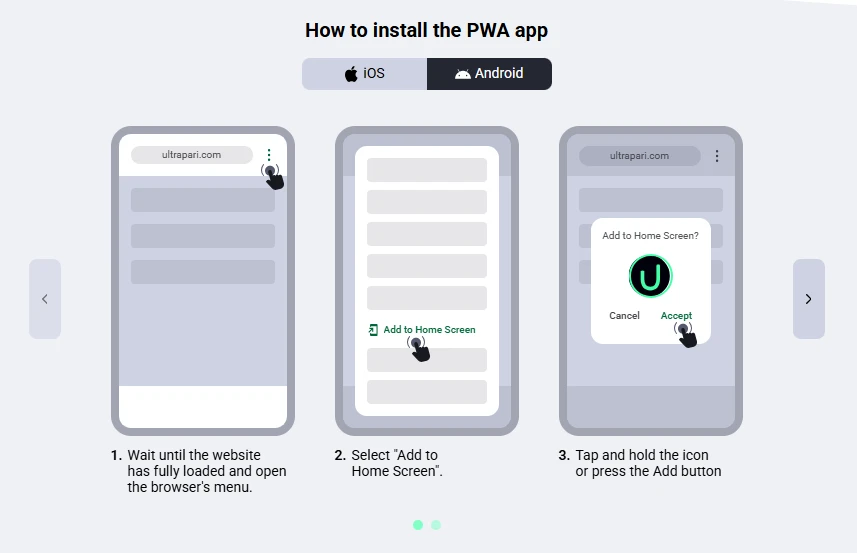
Android blocks apps downloaded outside Google Play by default. On modern Android versions, the permission isn’t a single system-wide switch. It is granted to the specific app you open the APK from, such as Chrome or File Manager.
On the Redmi Note 15, it works like this:
- Tap the APK. The phone shows a warning that it isn’t allowed to install apps from this source.
- Tap “Settings” in the warning.
- Turn on “Allow from this source” and go back.
To set it up in advance, open Android Settings → Privacy protection → Special permissions → Install unknown apps. Then grant the permission to your browser or file manager. The menu names may differ slightly on other brands and Android versions.
Google Play Protect may also flag the file as unknown. Tap “More details” → “Install anyway” to continue.
Step 3 – Install the Application
- Open the downloaded APK.
- Package Installer will show the app name and an “Install” button.
- Confirm the APK installation and wait for the installation progress bar to finish. On our device, it took a few seconds.
- Tap “Open”, or find the Ultrapari mobile app icon on the home screen or in the app menu.
The installed app takes about 120–140 MB, so keep around 200 MB free before you start. If the installation doesn’t start, check the free space and the storage permissions of your file manager. If that doesn’t help, download the APK again, since an interrupted download leaves a damaged file.
Step 4 – Open the App and Log In
Launch Ultrapari from its icon and wait for the interface to load. On the start screen, tap “Log in” if you already have a user account. Enter yo
How to Install the Ultrapari App on iPhone and iPad
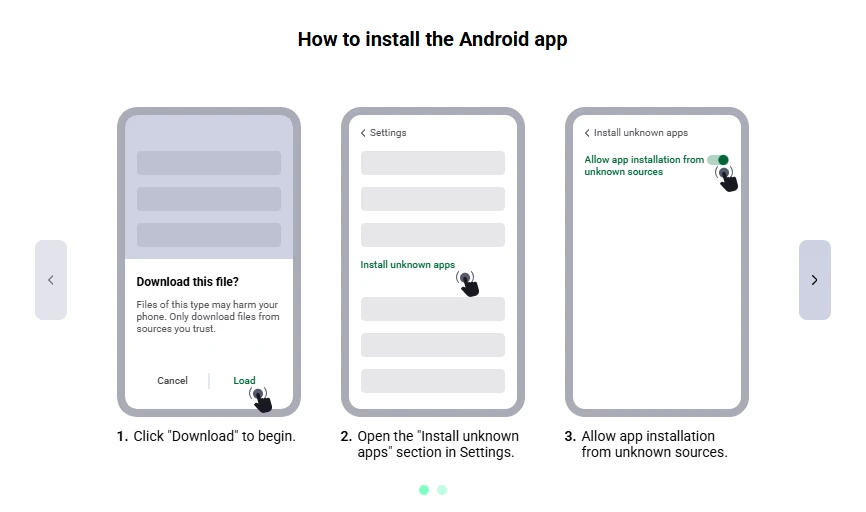
There is currently no separate Ultrapari app for iOS. The APK works only on Android, so iPhone and iPad owners use the operator’s own alternative: a web app installed from the Safari browser. It opens from a home screen icon and runs on the same account.
Is the App Available in the Apple App Store?
At the time of our check, we found no official app listing for Ultrapari in the Apple App Store. You can check this yourself by searching the brand name in the App Store: a genuine Ultrapari iOS application would list the operator as its developer.
Avoid IPA files from third-party sites. They bypass Apple’s review and may be modified. An App Store app installs natively with automatic updates, while Safari access always loads the current version of the site, so iPhone compatibility depends only on the browser.
How to Access the Platform on iOS
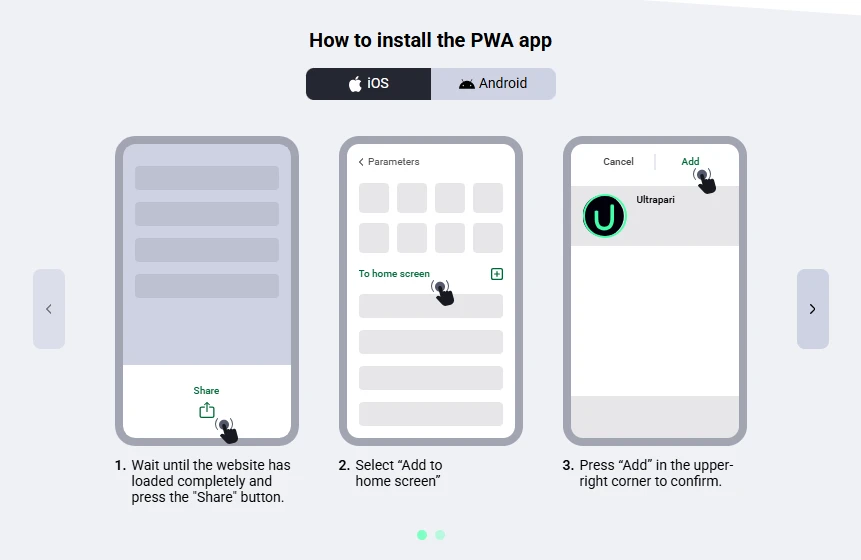
- Open the Ultrapari website in Safari.
- Tap the Share button.
- Choose “Add to Home Screen”.
- Confirm the shortcut.
- Launch the site from your home screen.
Note: This Progressive Web App (PWA) is not a native app per se and does not support all of its features (no push notifications, no access to special promotions when they become available).
Why Is the APK Not Installing?
Most installation errors have a simple cause:
- Installation blocked: the browser or file manager you opened the APK from doesn’t have the “Install unknown apps” permission. Grant it in Android Settings and open the file again.
- “App not installed”: this usually points to an incompatible Android version (below 7.0), a 32-bit processor instead of ARM64, a corrupted APK file, or a conflict with an older build signed differently. In the last case, delete the old app and install again.
- Insufficient storage: the download takes 40.6 MB, and the installed app grows to 120–140 MB. With less than about 200 MB free, the installation may stop halfway.
- Download interrupted: unstable mobile data or Wi-Fi can cut the download short and leave a damaged file. In our test on Robi at 6.85 Mbps, the full file arrived in 47–50 seconds. A weaker signal means a longer download and a higher risk of interruption.
- The Ultrapari App crashes or won’t open: update to the latest version, close background apps if the phone has little RAM, and clear the app cache in Settings → Apps. If it still fails, reinstall the APK and check your internet connection.
How to Verify the Download Source
Before installing, check three things: the domain, the download URL and the file itself. The download page should be on Ultrapari’s official website on the .com domain, and the file link should start with HTTPS on the same domain. The file should be named ultrapari-v255.0.0 and weigh about 40.6 MB. A different size or name is the first sign of a modified build.
Android checks APK file integrity through the developer signature. Updates install only if their signature matches the app already on the phone, so a fake build won’t install over the genuine one.
Google Play Protect may warn about any APK from outside Google Play. That warning alone doesn’t mean the file is malicious, and no warning doesn’t prove it is safe. What matters more are the app permissions requested during installation. A betting app has no reason to read your SMS, contacts or call log, so a request like that is a reason to stop.